How do I change the sort order of checklist items?
Follow
How to change the sort order of checklist items on a Checklist Template:
- Navigate to "Students Main" and find the My Checklist Templates section in the center column
- Select the Checklist Template you want to make changes to
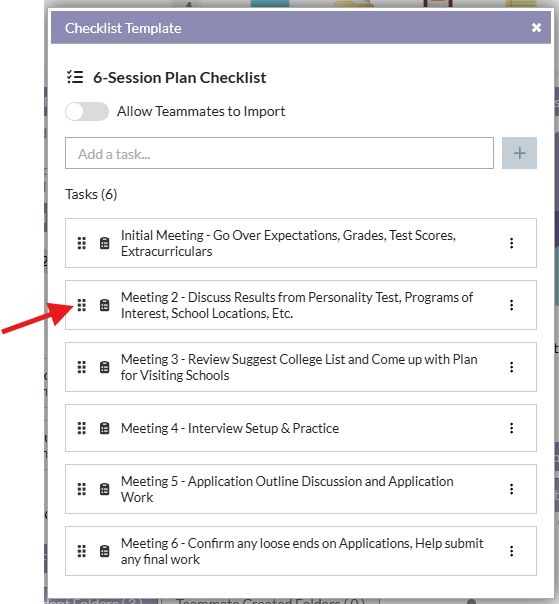
- Click on the 6-dot icon on the left side of the checklist item card
- Drag the item up or down to the desired location while holding the mouse button down to maintain control
- You can continue to move checklist items until the sort order is the way you want
How to change the order of checklist items on "My Checklist" for a specific student:
- Navigate to the student's profile page
- Go to the "My Checklist" section (left column)
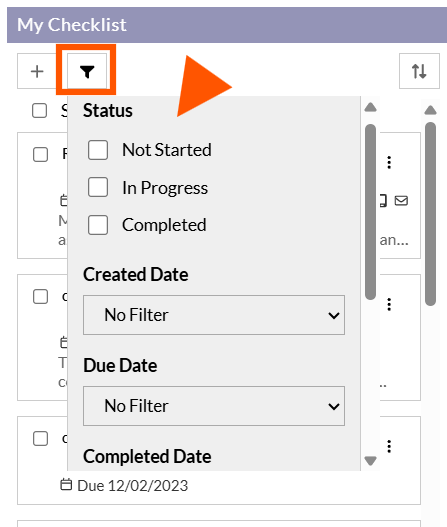
- You can either Filter by or Sort by, depending on what your objective is
- Filter by options include by Status, by Creation Date, by Due Date, by Completed Date, and by Template
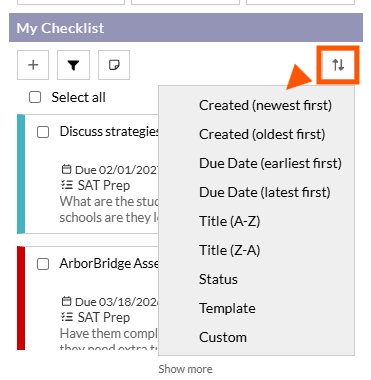
- Sort by options include by: Creation Date, Due Date, Title Name, Status, or Template, or Custom.
- Custom allows you to drag and drop item cards into any sort order you'd like, much like in the template design.
Comments
0 comments
Article is closed for comments.